> For the complete documentation index, see [llms.txt](https://handbook.opencoreventures.com/llms.txt). Markdown versions of documentation pages are available by appending `.md` to page URLs; this page is available as [Markdown](https://handbook.opencoreventures.com/startup-manual/gtm/pricing/pricing-page.md).
# Pricing Page
Your pricing page is likely the most visited page on your site after your homepage. This is not the place to innovate; follow the established conventions outlined below.
Simple page format example
1. **Skip useless headers.** Empty headers like “Simple, transparent pricing” or “Choose a plan that’s right for you” are just a distraction.
2. **Offer 2-4 pricing tiers and display them horizontally and above the fold.**
1. Give each tier its own box and button.
2. Call the free plan “Free” and show the price ($0). Don’t call it open source.
3. Use incremental feature lists and don’t repeat features across tiers.
4. Include usage limits and minimum thresholds in the features list.
5. Use “planned” instead of “coming soon” when noting upcoming features.
6. Use “SaaS” to describe hosted services and use “Cloud” to describe managed services.
7. Give each tier its own CTA button.
8. Make the most desired tier the primary call to action.
3. **Show the monthly price but** [**only offer annual billing**](/startup-manual/gtm/pricing.md#annual-billing)**.** Eliminating monthly subscription options simplifies your billing cycle, gives you more cash up front, and helps prevent churn.
4. **Display the enterprise price.** Including the price helps users self-select into the right category. If the listed enterprise is too much, it’s probably not the right category and acts as a gatekeeper for unqualified enterprise leads.
5. **Use font size and color to show information hierarchy.** Offering too many choices, toggles, and buttons adds friction, making it harder for people to make a choice. Don’t use small print and asterisks.
6. **Use CTA language that users understand, and make sure the action matches the language.**
1. “Sign up” leads to a sign-in page.
2. “Contact us” leads to a form. Don’t use direct email links. Require a company email address and company name as a minimum.
3. “Schedule demo” leads to an event scheduler.
### Handling multiple deployment options
1. **Present one choice at a time.** Help customers select a tier, then present deployment options during the signup and onboarding workflow. If deployment options vary by plan, display as a list item within each tier.
2. **Default to showing SaaS pricing.** If someone wants to self-host, they'll contact you. Put a line at the bottom: "Need to self-host? Contact us about Enterprise."
3. **Avoid:**
* Toggles for SaaS vs. Self-hosted vs. Desktop
* Icons trying to show which tier supports which deployment
* Separate pricing tracks for different deployments.
### Comparison tables
It’s duplicative and unnecessary to add a table comparing features across your tiers. Create tier-specific landing pages if you need to provide more information about each plan.
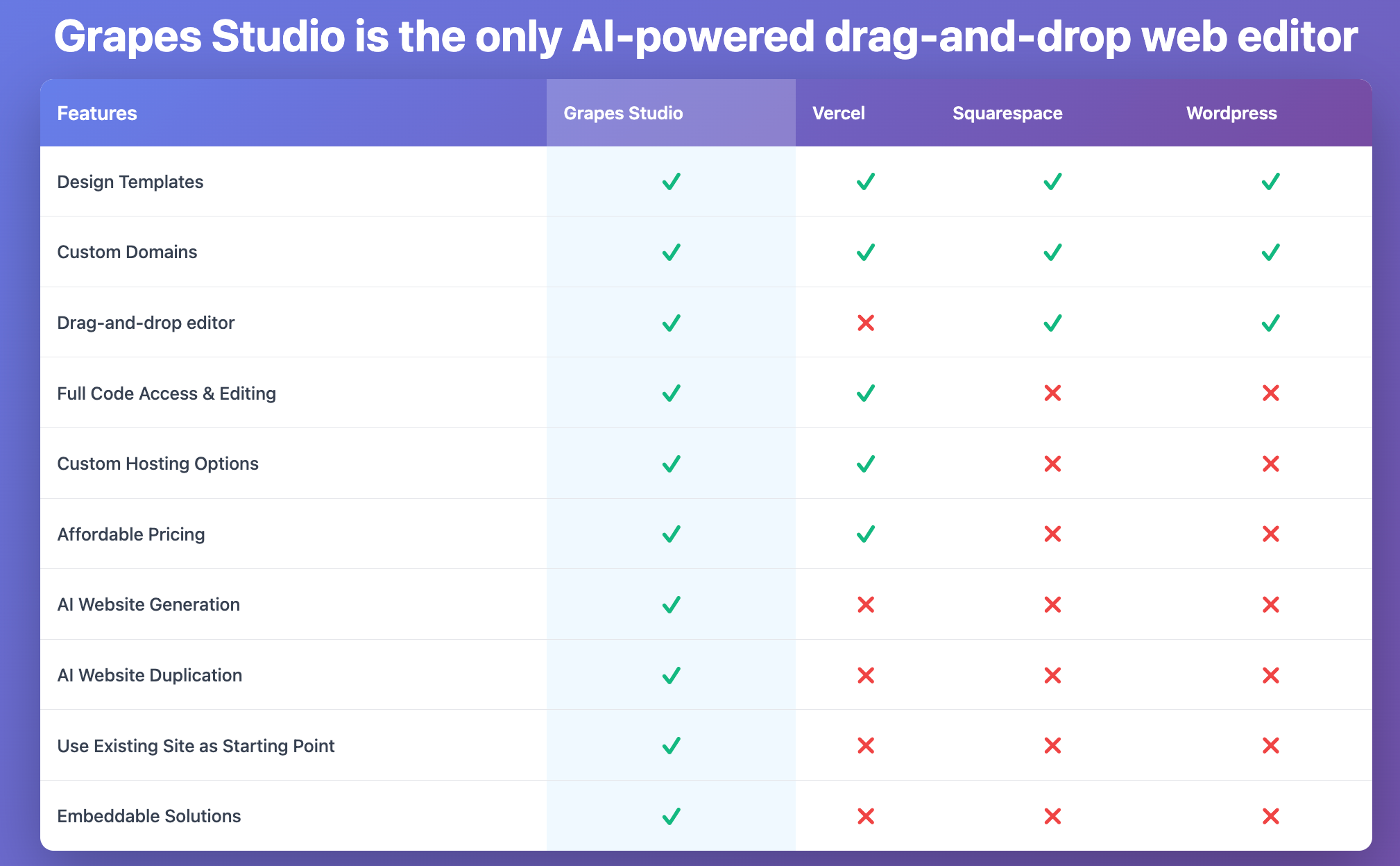
Competitive feature comparison tables, however, can add value when they are concise and visually appealing.
1. Call out your top value-add against your competitors in the header.
2. Organize rows to show decreasing feature parity. Common features go at the top.
3. Organize columns from most similar to least. Your product occupies the first column.
Competitive feature comparison table showing decreasing feature parity and a value-focused header.
### Cost calculators
Pricing calculators can be helpful when they demonstrate value or savings, such as showing cost comparisons against current solutions, ROI from time saved, or money saved versus competitors, because they help justify the purchase decision.
Calculators that simply compute usage-based costs (like "enter your token count to see what you'll pay") tend to add complexity without benefit, as customers struggle to estimate their usag,e and the calculation distracts from clear decision-making. If customers need a calculator just to understand what they'll be charged, your pricing structure is probably too complex and should be simplified first.
---
# Agent Instructions
This documentation is published with GitBook. GitBook is the documentation platform designed so that both humans and AI agents can read, navigate, and reason over technical content effectively. Learn more at gitbook.com.
## Querying This Documentation
If you need additional information that is not directly available in this page, you can query the documentation by asking a question.
Perform an HTTP GET request on the following URL with the `ask` and `goal` query parameters:
```
GET https://handbook.opencoreventures.com/startup-manual/gtm/pricing/pricing-page.md?ask=&goal=
```
`ask` is the immediate question: it should be specific, self-contained, and written in natural language.
`goal` is what the user is ultimately trying to achieve, the reason they need the answer. Sharing it helps GitBook give you a better, more relevant answer. A goal is most helpful when it describes the outcome the user wants rather than restating the question. For example, with `ask=how do I create an API token`, a goal like `automate deployments from our CI pipeline` lets GitBook tailor the answer to that use case.
The response will contain a direct answer to the question and relevant excerpts and sources from the documentation.
Use this mechanism when the answer is not explicitly present in the current page, you need clarification or additional context, or you want to retrieve related documentation sections.